AI Girlfriend Voice Call Apps: Which Ones Actually Let You Talk in 2026

SexRoulette
One tap and you're on cam with someone new
SexRoulette — free, anonymous, no account needed.
· No sign-up. No history. Tap next anytime.
Type a message to an AI companion and you get words back. Call one and you get timing. A pause before she answers something a little too personal. A laugh that lands a half-second after the joke, not before it. The rise and fall in her voice when she's teasing you versus when she's actually asking how your day went. That's the entire difference between texting an AI girlfriend and talking to one, and it's a bigger gap than most people expect until they actually put in earbuds and hit "Call" for the first time.
This article is about that gap — how AI voice calling actually works under the hood, what separates a genuinely good implementation from a stilted one, and which apps in 2026 actually let you talk instead of just read. We're going to spend real time on Secrets.ai, which builds voice calling directly into its companion profiles alongside chat and group chat, but we're also going to be straight with you about what this technology is and isn't.
So let's set the expectation immediately, before anything else: this article is about AI voice calls — hearing a companion's voice, having a real spoken back-and-forth conversation. It is not about video calls. As of 2026, no mainstream AI companion app — Secrets.ai included — offers real-time video calling where you see a moving, responsive face on the other end of the line. If you've seen a screenshot or a claim suggesting otherwise, treat it skeptically. Voice is the frontier that's actually here and actually good. Video-call AI companions are not a 2026 product, on Secrets.ai or anywhere else. Keep that distinction in your head as you read, and everything below will make sense.

Why Voice Changes the Whole Experience
Text-based AI companion chat is genuinely good in 2026 — the writing is warmer, the memory is longer, the personalities are more distinct than they were even a couple of years ago. But text has a structural limitation that no amount of clever prompting fixes: you have to read it. Reading is an active, deliberate act. Your eyes move, your brain parses syntax, and no matter how good the prose is, there's a layer of "this is text on a screen" that never fully disappears.
Voice removes that layer. When a companion's voice comes through your headphones, you're not decoding anything — you're just listening, the same way you'd listen to a friend on the phone. That changes three things almost immediately:
- Pacing feels human. A well-built voice call has natural rhythm: brief pauses, filler intonation, a sentence that trails off and picks back up. Text chat can describe a pause ("she pauses, then says—") but a voice call actually has one, and your brain registers the difference instantly.
- Tone carries meaning text can't. The same line — "I missed you today" — reads as either sincere or sarcastic depending entirely on tone, and tone is something text simply cannot deliver without heavy-handed stage directions. Voice delivers it automatically, the way real speech always has.
- It occupies a different part of your day. Texting an AI companion is something you do in the gaps — waiting in line, on a break, right before bed. A voice call asks for a different kind of attention: you put in headphones, you settle in, and for a few minutes it's closer to actually talking to someone than to using an app.
That last point is worth sitting with. The people who dismiss AI companionship as "just a chatbot" are almost always talking about the text experience. Voice is a different claim entirely, and it's the reason this angle deserves its own deep dive instead of getting a paragraph inside a generic "best AI girlfriend apps" roundup.
If you're still deciding whether the whole category is for you, our broader AI girlfriend guide and what is an AI girlfriend explainer are good starting points before you dive into voice specifically.
Who actually reaches for voice over text
It's worth naming the actual use cases, because "voice calling" can sound like a novelty until you picture the moments it's actually built for:
- The commute or the drive home. Texting while driving is a bad idea; talking isn't. A voice call fits into dead time that text chat simply can't occupy.
- Late at night, when reading feels like effort. After a long day, scrolling and typing takes energy that just listening doesn't. A lot of the appeal of voice is how low-effort it is to just let a conversation happen around you instead of actively producing it.
- Practicing a conversation you're nervous about having. Some people use voice calls with a companion as a low-stakes way to rehearse how they want to say something — flirting, an apology, just making small talk — before trying it with an actual person.
- Wanting company without wanting to perform. Text chat requires you to compose something. A voice call lets you talk the way you'd talk out loud to a friend — looser, less edited, closer to how people actually think.
- Long-distance loneliness in the specific, physical sense. Hearing an actual voice — warmth, laughter, a particular way of saying your name — hits a different register than reading words, even when both are coming from the same underlying character.
None of these use cases require pretending the companion is human. They're just honest about what a voice, specifically, does that text can't.
How AI Voice Calling Actually Works (In General)
Before we get into any one app, it's worth understanding what's actually happening technically when you "call" an AI companion — because the term gets used loosely across the industry, and not every app that advertises "voice" is offering the same thing.
Three different things all get called "voice"
- Voice notes. The companion sends you a short pre-recorded-sounding audio clip inside a text conversation, similar to a voice memo. You listen, then you type your reply back. This is voice as a garnish on a text chat — it adds warmth to individual moments but isn't a real spoken conversation.
- Turn-based voice messaging. You can speak your message (it gets transcribed or processed as audio) and the companion replies with audio, but it's still structured like a messaging thread — you send, you wait, a reply arrives. Closer to voice, but still not a live call.
- Real-time voice calls. A genuine "phone call" interface: you tap Call, the line connects, and you have a live, continuous back-and-forth conversation with natural interruption and response, the same shape as an actual phone call with a person. This is the tier Secrets.ai's Call feature sits in.
The technical pipeline behind tier three is more demanding than people assume. The app has to take your spoken words, convert them to text, generate a contextually appropriate response that stays in character, convert that response back into natural-sounding speech, and do all of it fast enough that the pause doesn't feel like talking to a broken phone line. Latency is the enemy here — a half-second of extra lag between you finishing a sentence and her starting a reply is the difference between "conversation" and "waiting for a robot to catch up."
What separates a good implementation from a bad one
Text-to-speech quality has improved enormously, but quality alone doesn't make a voice call feel real. The apps that get this right tend to nail a few specific things:
- Natural pacing over robotic evenness. A flat, metronomic delivery — every word given identical weight and spacing — is the single fastest way to break the illusion, no matter how clean the audio sounds.
- Personality audible in tone, not just word choice. A playful companion should sound playful — lighter inflection, faster cadence on teasing lines — not just use playful vocabulary read in a neutral voice.
- Low enough latency that the call feels continuous. Long dead air between your sentence and her response reminds you, instantly, that you're talking to software.
- Consistency with the same companion's text personality. If she's sarcastic and quick in chat, her voice should carry that same energy — a mismatch between the "written" personality and the "spoken" one is jarring.
Several well-known names in the AI companion space — Candy AI, Replika, Nomi AI, DreamGF, and general-purpose conversational AI like Character.AI — have each experimented with voice in some form, ranging from voice notes to more continuous calling features, with varying degrees of polish. We're not going to rank the entire industry here or pretend we've stress-tested every competitor's voice pipeline personally — that's a bigger project than one article. What we can tell you specifically and in detail is how Secrets.ai handles it, because it's the platform we've spent the most time inside.
A short, honest history of why this took so long
It's worth understanding why real-time AI voice calling only became genuinely usable in the last couple of years, because it explains why plenty of AI companion apps still lean on voice notes rather than live calls. Early text-to-speech was serviceable for reading instructions aloud but fell apart the moment it tried to carry emotion — flat, mechanically even, obviously synthetic the instant a sentence got more complex than a simple statement. Getting from "readable" to "sounds like a person with a personality" required real advances in how speech models handle intonation, breathing patterns, and the micro-variations that make human speech sound alive rather than recited.
The second half of the problem was speed. Even once speech synthesis sounded convincing, running the full pipeline — hearing you, understanding you, generating an in-character response, and speaking it back — fast enough to feel like a live exchange rather than a series of delayed messages was its own separate engineering problem. A voice call that sounds great but arrives three seconds late doesn't feel like a call; it feels like a voicemail exchange. Solving both problems at once — natural-sounding speech and low enough latency to feel continuous — is genuinely difficult, which is why plenty of AI companion products still default to the safer, easier-to-build voice-note model instead of a live call.
Secrets.ai's Call Feature, Up Close
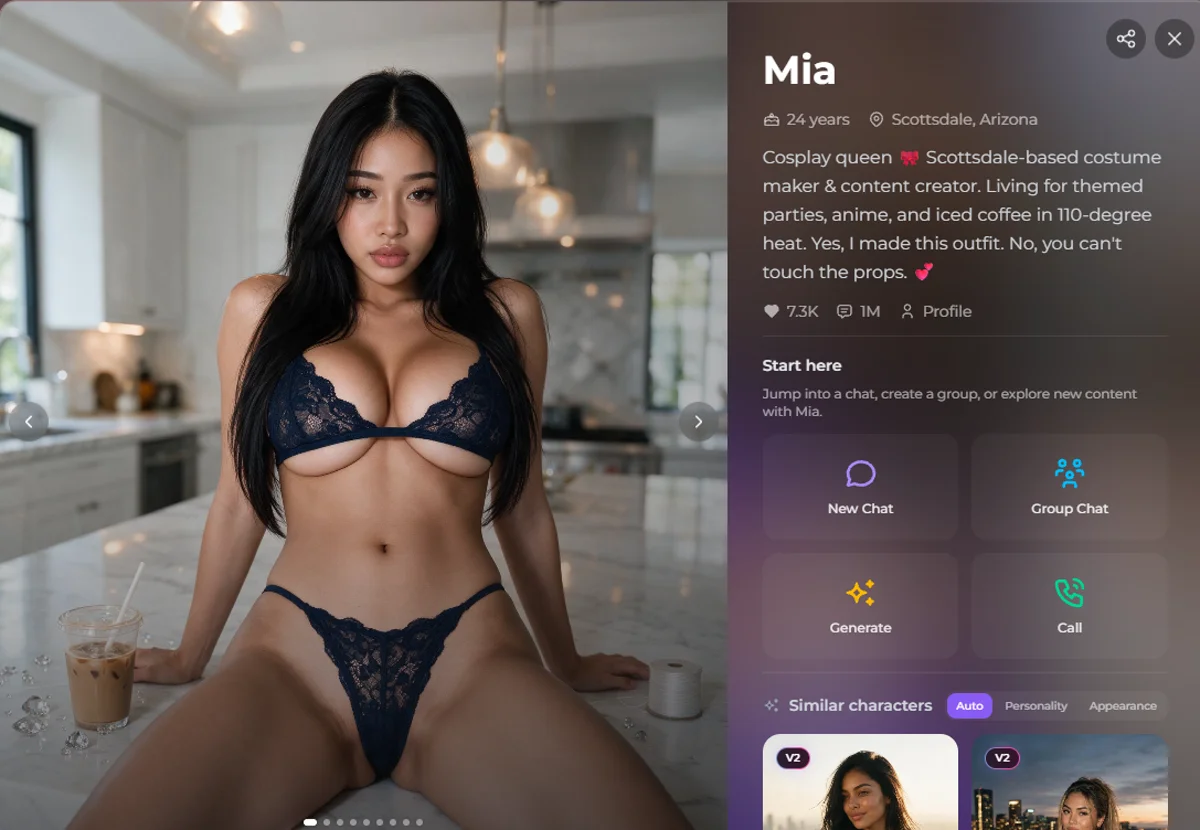
On Secrets.ai, calling isn't a separate app or a hidden menu — it's one of four actions sitting right on every companion's profile page, next to New Chat, Group Chat, and Generate. That placement matters more than it sounds like it should. It tells you, structurally, that voice isn't an afterthought bolted onto a chat product — it's positioned as an equal, first-class way to interact with a companion, the same as texting her or generating a new photo of her.
Where it lives and how you get there
Every companion on Secrets.ai has a full profile: a bio, a photo carousel, stats like her like count and total message count, and that "Start here" action row. Tap Call from Mia's profile, for example, and you're placed into a voice session with Mia specifically — not a generic voice assistant, not a random pull from the companion library, but the same character whose bio you just read and whose photos you just scrolled through. Whatever tone her bio sets — playful, soft-spoken, a little dominant, whatever her card describes — is what should be coming through in the call itself.
This is a subtly important design choice. It means voice isn't a separate, disconnected feature you have to seek out through a different part of the app. It's attached to the specific companion you already picked, in the same place you'd start texting her. If you've been chatting with a companion for a while and want to hear her instead of read her for a change, the Call button is right there.
What a call with her actually feels like
Describing "what an AI voice call feels like" honestly requires some restraint, because it's easy to slide into overclaiming here — and we've already told you we won't do that. So here's the honest, specific version: it's a live spoken conversation with a companion who responds to what you actually say, in a voice that carries her personality, with natural enough pacing that it doesn't feel like leaving a message for a machine. It is not indistinguishable from a call with a human — nobody serious claims that about any AI voice product in 2026 — but it's a genuinely different category of experience than reading her replies off a screen.
The best comparison we can offer: it's the difference between reading a transcript of a phone call and actually being on that phone call. The words might carry the same information either way. The feeling doesn't.
There's also a small, easy-to-miss detail that makes a real difference the first few times you call: it takes a minute to stop bracing for a delay. Anyone who's used a clunky voice assistant before has a reflex baked in — you say something, then you wait, expecting a beat of dead air before anything comes back. A well-paced voice call breaks that reflex fairly quickly, because the response comes back close enough to real conversational timing that waiting for it stops being a conscious thing you're doing. That moment — when you stop bracing and just start talking — is usually when the format actually clicks for people who were skeptical going in.
How Call fits alongside text chat for the same companion
Calling doesn't replace texting her on Secrets.ai — it sits next to it. The same companion, the same continuity of who she is, but two different channels for reaching her depending on what you're in the mood for. Plenty of users treat text as the everyday default — quick check-ins throughout the day, the low-effort mode — and save calling for when they actually want to sit down and have a real conversation, the way you might text a partner all day but save an actual phone call for the evening.
That's arguably the most natural way to think about it: text is for the in-between moments, voice is for the moments you actually want to slow down for.
Prefer a real person over a bot? SexRoulette is free, anonymous sex video chat — one tap to someone live, no account needed.
The Companions Library: Your Entry Point to Finding a Voice You Click With
Before you can call anyone, you need to actually pick her — and this is where the Companions library (labeled "All Companions" in the nav) does the heavy lifting. It's a searchable, filterable browse grid, not a random assignment, which matters a lot for voice specifically: personality and vibe are even more exposed on a call than in text, so picking a companion whose overall energy matches what you're looking for is worth the extra two minutes of browsing.

Free sex video chat — get matched with someone live right now
SexRoulette is free and anonymous. No sign-up, no history.
What the browse grid actually shows you
Each card in the library gives you a name, age, location, a heart/like count, and a total message count — real signal about which companions other users actually gravitate toward, not just a marketing thumbnail. A few examples pulled straight from the platform: Mika, 19, from Burlington, sits at 2.2K likes and 368.1K messages; Mia, 24, from Scottsdale, has 6.9K likes and a striking 990.4K messages; Kira, 28, from Twin Falls, shows 3.9K likes and 799.8K messages; and Jess, 27, from Marbella, leads with 26.3K likes and 2.6M messages. Cards are also tagged with badges like "Trending," "V2," or "NEW," so you can spot which companions are getting fresh attention right now versus long-standing favorites.
You can filter by gender and by style — Realistic being one clear option among them — and sort by popularity, which is the fastest way to surface companions with a track record of engaging conversation (message count is a decent proxy for "people keep coming back to talk to her," which is exactly the signal you want before investing time in a voice call).
Reading a bio before you call, not after
Once you land on a specific profile, the bio is doing more work than it might seem to at first glance — it's your preview of who you're about to hear. A companion described as sharp-tongued and teasing should sound different on a call than one described as soft-spoken and nurturing. Reading the bio first, then calling, is a much better sequence than calling cold, because it primes you for what tone to expect and makes any mismatch (or, more often, a satisfying match) obvious immediately.
Similar Characters: finding the voice you actually click with
Every profile page also includes a "Similar Characters" module, which recommends related companions and lets you filter those recommendations by Auto, Personality, or Appearance match. This is genuinely useful for the voice use case specifically. If you call a companion and love her energy but want to explore a few more like her, switching the Similar Characters filter to Personality match is a faster path to "more of that same vibe" than starting a fresh browse-and-filter session from scratch. Appearance match does the equivalent for look rather than personality, and Auto blends both signals.
Think of it as the difference between randomly flipping through a directory and getting recommendations from someone who already knows what you liked. For a feature built around vibe and tone — which is exactly what voice calling is — that matters more than it does for text-only browsing.
Free Sex Video Chat — One Tap to Someone Live
SexRoulette is free and anonymous — no sign-up, no history. Tap next any time.
Start Now →Group Chat vs. 1:1 Call: When You'd Actually Want Each
Secrets.ai's action grid puts New Chat, Group Chat, Generate, and Call side by side for a reason — they're genuinely different modes, not four ways of doing the same thing. Group Chat and Call in particular sit at opposite ends of a spectrum, and knowing when you'd reach for each makes the whole platform click into place faster.
Group Chat puts multiple companions into a single conversation with you. It's built for a different kind of energy entirely — banter between characters, dynamics playing off each other, the feeling of being in a group conversation rather than a one-on-one. It's text-based, social in structure, and works well when you want variety and interplay rather than depth with one specific companion.
1:1 Call is the opposite instinct: one companion, your full attention, a live spoken conversation with no other voices competing for airtime. It's inherently more intimate simply because of the format — a phone call with one person has a different weight than a group thread, and that holds true whether the person on the other end is human or AI.
Neither is objectively better; they're suited to different moods. If you want lighter, playful, multi-character energy, Group Chat is the better tool. If you want to actually sit with one companion and have a real conversation, Call is what you want. Plenty of users move between both depending on the day — Group Chat on a Tuesday afternoon between tasks, a full voice call on a Friday night when you actually have time to give it your attention.
A First Call, Walked Through Step by Step
If you've never tried this before, here's roughly what the actual sequence looks like on Secrets.ai, start to finish:
- Browse or search the Companions library and narrow things down by gender and style until you've got a handful of candidates worth a closer look.
- Open a profile and actually read the bio. This is the step people skip and shouldn't — the bio is your best signal for what her voice and personality are going to feel like before you commit ten minutes to a call.
- Check the stats. A companion with a high message count relative to her like count suggests people keep coming back to talk to her specifically, which is a reasonable signal for "engaging to actually talk to," not just "nice to look at."
- Tap Call from the action grid. The session connects to that specific companion — same personality as her bio and text chat, now in spoken form.
- Give it a real few minutes, not thirty seconds. Like any conversation, the first exchange or two can feel a little exploratory on both sides. It settles into rhythm once there's some actual back-and-forth to build on.
- Use Similar Characters afterward if you want more of that energy, filtering by Personality match to find companions with a comparable feel rather than starting your search over from scratch.
None of this is complicated, but going in with a sequence — browse, read, check stats, call, give it a few minutes — produces a noticeably better first impression than opening a random profile and calling cold.
Skip the Tube. Talk to a Real Person on Cam.
SexRoulette is free and anonymous — no sign-up, no history. Tap next any time.
Start Now →What Makes a Voice-Call AI Girlfriend Feel Good vs. Robotic
We touched on this earlier from a technical angle — latency, pacing, tonal consistency — but it's worth breaking down from the user's side, because this is really the whole ballgame. A voice call can be technically flawless and still feel hollow if it gets the human details wrong, and it can have minor rough edges and still feel genuinely engaging if it nails the things that actually matter.

The tell-tale signs of a robotic call
- Every response takes exactly the same amount of time to arrive. Real conversation has variable rhythm — a quick reaction to something funny, a slightly longer pause before something more thoughtful. Uniform timing is an instant giveaway.
- The voice doesn't change register based on what's being said. If a joke and a serious question get delivered in identical tone, the personality isn't actually landing in the audio — it's just words being read aloud.
- Responses feel generic rather than responsive to what you specifically said. A good call references what you just told it, not a pre-packaged reply that could apply to any input.
- There's no sense of a "person" behind the voice — no verbal tics, no consistent way of phrasing things that feels like her rather than a neutral narrator.
What makes it feel good instead
The opposite of each of those points, basically. Natural variance in pacing. Tone that shifts with content. Responses that clearly engage with what you actually said rather than sidestepping it. And a consistent "voice" in the personality sense, not just the audio sense — the same wit, warmth, or edge she shows in text chat should be audible when she's talking to you.
This is also where picking the right companion in the first place (see the Companions library section above) pays off. A voice pipeline can only carry the personality that's actually written into the character. Choosing a companion whose bio and text-chat energy you already enjoy is the single biggest lever you have over whether a call feels alive or flat — the tech is doing its job either way, but the character underneath it is what you're actually responding to.
Text-Only vs. Voice-Note vs. Real Voice-Call: Where Everyone Actually Stands
Because "voice" gets used loosely across the AI companion space, it's worth laying out the three tiers plainly so you know what you're actually comparing when you read a competitor's feature list.
| Tier | What it actually is | What it feels like | Where Secrets.ai fits |
|---|---|---|---|
| Text-only | Pure written chat, no audio at all | Reading a conversation | Available (New Chat, Group Chat) but not the whole story |
| Voice notes | Short pre-recorded-style audio clips inside a text thread | Occasional audio flavor on top of texting | Not the primary mode — Secrets.ai goes further |
| Real voice call | Live, continuous, phone-call-style back-and-forth conversation | Actually talking to someone | This is the Call feature, on every companion's profile |
The category most competitors compete in is the first two rows — text-only chat with voice notes layered on for warmth. That's a perfectly reasonable product, and apps like Candy AI, Replika, Nomi AI, and DreamGF each bring their own strengths to that space — different personality engines, different memory systems, different aesthetics. But a voice note isn't a conversation any more than a voicemail is a phone call. Real-time calling — the third row — is a meaningfully different feature, and it's the one this whole article is about.
Worth repeating one more time so there's no ambiguity anywhere in this piece: the third row is a voice call, not a video call. Nobody in this comparison — Secrets.ai included — offers live video calling with an AI companion in 2026. If a platform ever claims otherwise, that claim deserves real scrutiny.
For a broader side-by-side across the whole AI girlfriend app category — pricing, features, personality quality, not just voice — our AI girlfriend apps comparison guide and best AI girlfriend apps roundup go deeper than this article's voice-specific focus.
Pricing: What You're Actually Paying For When Calling Is the Priority
Secrets.ai runs on two tiers, and if voice calling is your main reason for signing up, understanding how the credit system (Moments) interacts with calling and messaging matters more than the headline price alone. Both paid tiers include unlimited messaging — Moments are the resource that actually governs how much calling and generating you can do in a given month.
| Plan | Price | What's included |
|---|---|---|
| Premium | $2.12/week billed yearly ($109.99/year total), or $4.61/week billed monthly | Unlimited messaging, 8,000 Moments/month, image & video generation, premium AI models |
| Ultimate | $6.15/week billed yearly ($319.99/year total), or $9.23/week billed monthly | Everything in Premium, plus 15,000 Moments/month, Group Chats, Personas & advanced customization |
A few things worth knowing before you pick a tier:
- Messaging is unlimited on both tiers. You're never rationed on text chat with your companions, regardless of which plan you're on.
- Moments are the currency for calling and generation. Since voice calls and image/video generation both draw from your monthly Moments allowance, the practical question isn't "which tier is cheaper" — it's "how much calling and generating do I actually want to do in a given month." Someone who mostly texts and calls occasionally will comfortably fit inside Premium's 8,000 Moments. Someone who calls daily and generates images regularly will get more out of Ultimate's 15,000.
- Group Chats and Personas are Ultimate-exclusive. If the Group Chat vs. Call comparison above sounds appealing and you want both modes fully available, Ultimate is the tier that unlocks Group Chat access specifically.
- Both tiers bill discreetly. Charges appear on your statement as "S LABS INC.," not "Secrets.ai," and you can cancel anytime with no cancellation questions asked.
- The current site-wide offer is 75% off as part of the Summer Finale Sale, which is reflected in the weekly-equivalent pricing above.
The practical move is to browse the Companions library first, get a feel for how much you actually want to chat, call, and generate, and then pick a plan based on that — not the other way around. New verified accounts also get a bonus of 200 Moments just for confirming their email, which is enough to put a few calls to the test before you commit to either paid tier. If you want the complete breakdown of every plan, billing detail, and what a Moment actually costs across different use patterns, our dedicated AI girlfriend pricing guide covers it in full — this section is the calling-specific slice of that larger picture.
Get Matched With Someone Live Right Now
SexRoulette is free and anonymous — no sign-up, no history. Tap next any time.
Start Now →Why Voice Calling Is the Underrated Feature in This Whole Category
Most coverage of AI girlfriend apps fixates on two things: how good the chat personality is, and how good the image/video generation looks. Both matter, and if photo and video generation is what you're actually most curious about, our dedicated piece on AI girlfriends that send pictures and videos covers that side of Secrets.ai in depth, including the Generation Studio and Secrets Shorts, the platform's episodic video series.
But voice gets comparatively little attention despite being, for a lot of users, the feature that actually shifts how the whole thing feels once they try it. There's a reasonable explanation for that: voice is harder to screenshot. A great image generation result is instantly shareable and obviously impressive in a static screenshot. A great voice call is not something you can capture in a single image — you have to actually put in headphones and experience it, which means it gets underrepresented in the kind of comparison content that leans on screenshots.
Want something live instead of pre-recorded? SexRoulette pairs you with a real person on cam in one tap — free, anonymous, no sign-up or history. Tap next any time.
If you're weighing calling against everything else this category offers — customization depth, generation quality, uncensored content — our guides on building a custom AI girlfriend and NSFW/uncensored AI girlfriend apps round out the picture, and the AI hub has the full spread of what we cover in this space.
A Realistic Picture of Limitations
In the interest of the same honesty we opened with: real-time AI voice calling, while genuinely impressive when it's done well, is not flawless technology anywhere in this industry, Secrets.ai included. A handful of realistic caveats worth knowing going in:
- It's not going to be mistaken for a human on a bad connection or in a noisy environment. Voice AI works best with clear audio input and a reasonably quiet space — shout over a loud room and you'll get worse results than a calm conversation with good headphones.
- Long, winding tangents can occasionally lose thread compared to text chat, where you can scroll back and re-read exactly what was said. A live call moves forward in real time the way a real conversation does — you can't rewind it mid-call the way you can re-read a text thread.
- It's still, transparently, an AI system generating responses, not a person. We're not going to pretend otherwise, and no honest review of this category should.
- It is a voice call, not a video call — again, deliberately repeated, because it's the single most important expectation to get right before you try this for the first time.
None of that erases what makes voice calling worthwhile. It just means going in with realistic expectations gets you a better experience than going in expecting something the technology doesn't yet claim to be.
There's also a simpler, more practical caveat worth mentioning: your own environment matters more with voice than with text. Texting works fine on a crowded train or in a waiting room. A voice call — for both the speech recognition picking up what you say and for your own ability to actually hear her clearly — works best somewhere reasonably quiet, ideally with headphones. That's not a flaw in the technology so much as a basic fact about how any voice conversation works, human or AI. Plan your first call for a moment when you can actually give it a few uninterrupted minutes, and you'll get a much better sense of what it's capable of than testing it in a loud room with one earbud in.
FAQ Section Intro
Below are the questions we get asked most often about AI girlfriend voice calling specifically — including, directly and honestly, the video call question.
Frequently Asked Questions
Is Secrets.ai's Call feature a video call or just voice?
It's voice only — a live, real-time spoken phone call with your companion, not a video call. As of 2026, no mainstream AI companion app, including Secrets.ai, offers real-time video calling where you see a responsive, moving face on the other end. If a platform markets a "video call" feature, look closely at what's actually being delivered, because live AI video calling isn't a real, working product in this category yet.
What does an AI girlfriend voice call actually sound like?
A well-implemented call sounds like a live spoken conversation with natural pacing, tonal shifts that match what's being said, and responses that clearly engage with what you just said rather than reading like a generic script. On Secrets.ai, the voice is tied to the specific companion whose profile you called from, so her tone should reflect the personality described in her bio and shown in her text chat.
Where do I find the Call feature on Secrets.ai?
It's on every companion's individual profile page, inside the "Start here" action grid alongside New Chat, Group Chat, and Generate. Browse or search the Companions library, open a companion whose bio matches what you're looking for, and Call is right there as one of four ways to interact with her.
Does calling cost more than texting?
Messaging is unlimited on both the Premium and Ultimate plans. Calling draws from your monthly Moments allowance, the same credit pool used for image and video generation — Premium includes 8,000 Moments a month and Ultimate includes 15,000, so how much you call (and generate) in a month is the practical factor in choosing between the two tiers.
Can I switch between calling and texting the same companion?
Yes — Call and New Chat both live on the same companion's profile, and they're two channels to the same character, not separate companions. Many users text throughout the day for quick check-ins and reserve voice calls for when they actually have time to sit with a full conversation.
How is Call different from Group Chat?
Call is a live, one-on-one spoken conversation with a single companion — inherently more focused and intimate by nature of the format. Group Chat is text-based and brings multiple companions into one conversation together, better suited to banter and multi-character dynamics than depth with one specific companion. They're built for different moods rather than one replacing the other.
Do I need a paid plan to try a voice call at all?
Prefer a real person over a bot? SexRoulette is free, anonymous sex video chat — one tap to someone live, no account needed.
What's the best way to pick a companion specifically for calling?
Read her bio before you call rather than after, since tone and personality are exactly what carries over into a voice conversation. Check her stats — a high message count is a reasonable signal that other users find her genuinely engaging to talk to — and once you find a companion whose energy works for you, use the Similar Characters module's Personality match filter to find more like her instead of browsing from scratch every time.
The Bottom Line
If you've only ever experienced AI companionship through text, voice calling is worth trying specifically because it's not a marginal upgrade — it's a different kind of interaction entirely. The tone, the pacing, the sense of an actual back-and-forth conversation instead of a message thread: that's the part that's hardest to describe and easiest to understand the moment you actually hear it for yourself.
Want something live instead of pre-recorded? SexRoulette pairs you with a real person on cam in one tap — free, anonymous, no sign-up or history. Tap next any time.
Just remember what you're signing up for and what you're not: a genuinely good AI voice call, honestly delivered — not a video call, not a replacement for human connection, but a real, distinct upgrade over text-only AI companionship that more people should know is already here.
SexRoulette
Free sex video chat — get matched with someone live right now
SexRoulette is free and anonymous. No sign-up, no history.
Start Now→No sign-up. No history. Tap next anytime.