AI Girlfriend That Sends Pictures and Videos: What Actually Works in 2026

SexRoulette
Free sex video chat — get matched with someone live right now
SexRoulette is free and anonymous. No sign-up, no history.
· No sign-up. No history. Tap next anytime.
Why "just text" stopped being enough
Somewhere around 2023, the first wave of AI companion apps figured out how to hold a conversation. That was the whole pitch: type something, get a reply that sounded like a person, feel a little less alone at 1 a.m. It worked, for a while. But talk to enough people who've actually used these apps and a pattern shows up fast — the text gets old. You already know how the sentences are going to sound. What you don't have is a face to picture, a body to imagine, a video that actually moves instead of just describing motion in a paragraph.
That's the gap that "AI girlfriend that sends pictures and videos" searches are really about. People aren't looking for a chatbot with a profile photo bolted on. They're looking for a companion that can actually show them something — a new photo on request, in a new outfit, a new pose, a new setting, ideally a companion whose face stays recognizably her from one image to the next. Some are looking for actual video, not a slideshow of near-identical stills. A smaller but growing group wants something closer to a show: an ongoing story with episodes, not just a photo dump.
The bad news is that most of the apps ranking for this exact phrase don't really deliver on it. They either generate a generic, off-model face that looks nothing like the character's profile picture, cap you at a couple of low-res images a day, or advertise "video" and hand you three seconds of a still photo with a subtle zoom effect. The good news is that a handful of platforms have actually built this properly — real diffusion-based image generation tied to a specific character, reference-photo support so the output looks like your companion and not a random face, and in one case, something no competitor currently offers at all: scripted, episodic mini-series video starring your AI companion, released weekly like a streaming show.
There's also a real psychological difference between text and visuals that's worth naming directly, because it explains why this search term exists in the first place. A wall of text asks you to do the imaginative work yourself — you supply the face, the body, the scene, entirely from your own head. A generated photo does that work for you, and does it specifically, in a way that's tied to a character you've actually been building a rapport with over days or weeks of conversation. That's a fundamentally different kind of engagement, and it's why "does this app actually send pictures" has become one of the first questions serious AI companion users ask before they commit money to a subscription — text-only apps simply can't answer it.
Prefer a real person over a bot? SexRoulette is free, anonymous sex video chat — one tap to someone live, no account needed.
If you're brand new to the category and want the broader landscape before diving into image and video specifics, our AI girlfriend 101 explainer and full AI girlfriend apps guide are good starting points. This article assumes you already know the basics and want to understand the picture/video mechanics specifically.
A quick note on how to actually use this guide: it's organized to move from theory to practice. The next two sections explain the underlying technology and the criteria that separate a strong implementation from a weak one — read those first if you want to be able to evaluate any AI girlfriend app's generation claims critically, not just Secrets.ai's. After that, we go deep on one specific platform's actual feature set, because abstract criteria are only useful once you can see them applied to something real. If you already know the technology cold and just want the Secrets.ai specifics, feel free to skip ahead to the Generation Studio walkthrough.
How AI girlfriend photo and video generation actually works
To judge whether an app's image generation is any good, it helps to understand what's actually happening when you tap "generate." None of this requires a computer science degree — but the plain-English version explains almost everything about why some apps produce consistent, attractive results and others produce a different-looking woman every single time.
The generation model
Every image an AI companion sends you is created by a diffusion model — the same family of technology behind tools like Midjourney or Stable Diffusion, just fine-tuned and packaged for companion apps specifically. The model starts with random visual noise and, guided by a text prompt (and often a reference image), gradually refines that noise into a coherent picture over a series of steps. Better models use more parameters, more training data, and more refinement steps, which is part of why some platforms let you choose between a faster, cheaper model and a slower, higher-fidelity one.
This matters for you practically in one big way: not all "AI-generated photo" claims are equal. A platform running a lightweight, older model will generate faster and cheaper, but faces will drift, hands will occasionally look wrong, and skin texture will read as plastic-y. A platform running a current, well-tuned model produces images that hold up to a close look — correct anatomy, believable lighting, skin that doesn't look airbrushed into an uncanny valley.
There's also a fine-tuning layer worth understanding. A general-purpose image model, straight out of the box, doesn't know anything about "AI girlfriend" content specifically — it's been trained broadly on a huge range of imagery. Companion platforms fine-tune that base model further on a much narrower, curated dataset built specifically for realistic companion photography: skin tones and textures that read as human rather than rendered, natural body proportions, believable indoor and outdoor lighting setups, and so on. This fine-tuning step is a big part of why two platforms can technically be running "the same" underlying diffusion architecture and still produce noticeably different-looking results — the fine-tune is where a lot of the actual quality difference lives, and it's invisible in marketing copy, which is exactly why hands-on testing matters more than reading feature lists.
Generation time and queueing
The other practical factor that rarely makes it into marketing pages is how long you actually wait for a result. A higher-fidelity model with more refinement steps takes longer to render than a lightweight one — that's an unavoidable tradeoff, not a bug. What varies platform to platform is how that tradeoff is handled: some apps queue every request through shared server capacity, so wait times balloon during peak hours; others prioritize paid tiers, so a subscriber's generation request jumps the line ahead of free-tier traffic. If you've ever waited two or three minutes for a single image on a free trial only to have it generate almost instantly after upgrading, that's the mechanism at work.
Reference photos and character consistency
The single biggest technical differentiator in this whole category is consistency — does the woman in image #47 still look like the woman in image #1? Early AI companion generators were notorious for "face drift," where a companion's jawline, eye shape, or skin tone would subtly (or not so subtly) shift with every new generation, because the model was only loosely anchored to the character and mostly following the text prompt.
The fix is reference-photo conditioning: instead of generating purely from text, the model is given one or more actual images of the character and told to preserve her specific facial structure, proportions, and identifying features while varying the pose, outfit, setting, or expression described in the prompt. Platforms that support uploading multiple reference photos (rather than just one) generally produce more reliable consistency, because the model has more angles and lighting conditions to lock onto.

Prompts, and why length and structure matter
The text prompt tells the model what to change about the scene: the outfit, the pose, the setting, the lighting, the mood. Prompt length caps vary by platform — a generator that only accepts a short prompt forces you to be vague, which produces generic results. A generator with a generous character limit lets you actually describe what you want in layered detail: setting, wardrobe, camera angle, lighting, expression, all in one pass, which is a large part of why some platforms' output feels more "directed" and less like a random slot-machine pull.
Video: real motion vs. animated stills
"Video" is where the marketing gets loosest across this entire category. There are two fundamentally different things happening under that label:
- Animated stills — a generated photo run through a motion or parallax filter that adds a subtle zoom, sway, or blink. Technically video, but there's no real new visual information — it's the same static image with movement layered on top.
- True generative video — frames generated in sequence with actual continuity of motion, camera movement, and scene progression, closer to a real video clip than an animated photo.
A smaller and more distinct category is scripted episodic video — pre-produced, story-driven mini-episodes featuring a companion character, structured like a streaming series rather than generated on-demand per request. This is a meaningfully different product than either of the above, and we'll dig into it in detail later in this guide, because it's the single biggest differentiator between AI girlfriend apps right now.
One honest note worth flagging up front: as of 2026, no mainstream AI companion platform — Secrets.ai included — offers genuine real-time, two-way live video calling with a companion. If you see that claim somewhere, be skeptical. What Secrets.ai and comparable platforms do offer is an AI voice call feature, which is a real, working feature — just not video. We cover that distinction in more depth in our AI girlfriend voice call apps guide.
What separates a good implementation from a bad one
Once you understand the mechanics, evaluating any given AI girlfriend app's photo and video generation gets a lot easier. Here's what to actually check before you commit money to a subscription.
Facial and body consistency across generations
Generate the same companion in three or four different outfits and settings, back to back. Does she still look like the same person? This is the single most common failure point in cheaper platforms, and it's usually caused by either a weak underlying model, no reference-photo support, or both.
Resolution and actual image quality
"High quality" is a meaningless marketing phrase without a number attached. Look for platforms that state an actual resolution tier (Secrets.ai, for example, generates at 1.5K resolution) rather than vague quality claims. Zoom into skin texture, hands, and background detail in any sample images the platform shows publicly — that's usually a faster tell than anything in the marketing copy.
Generation speed and batch options
Some platforms only let you generate one image at a time, which turns finding "the one" into a slow, expensive slog. Better platforms let you generate in batches — 2, 4, or 8 images per prompt, for example — so you can compare options from a single prompt and pick the best result instead of re-rolling one image repeatedly.
Whether you can guide generation with your own reference photos
This is a feature, not a given. Platforms that let you upload your own reference images (not just rely on the character's default training data) give you meaningfully more control over consistency, styling, and even letting a companion "wear" a specific outfit you have in mind.
Content restrictions and what's actually allowed
This is the category's biggest practical filter. A lot of AI companion apps market themselves as adult platforms and then apply heavy-handed content filters the moment generation gets specific, which is frustrating after you've already paid. Before subscribing anywhere, it's worth understanding the landscape of what's actually permitted platform to platform — our NSFW and uncensored AI girlfriend apps guide breaks that down across the market in detail.
Mobile experience, not just desktop
A lot of AI companion usage happens on a phone, late at night, in short sessions — which means a generator that's clunky or slow on mobile is a real practical problem, not a minor detail. Check whether the reference-photo upload flow, the batch-size picker, and the prompt box all work smoothly on a phone browser before assuming a platform's generation features translate well outside of a desktop demo. A dashboard that's genuinely designed for a compact screen, with the model tier, mode toggle, and prompt box all reachable without excessive scrolling or hidden menus, tends to get used a lot more consistently than one that technically works on mobile but was clearly designed desktop-first.
Credit economics — what a generation actually costs you
Every platform that offers unlimited messaging still meters image and video generation somehow, usually through a credit system. What matters is the ratio: how many generations does your monthly allowance actually buy you, and does a bigger subscription tier meaningfully increase that number, or just add a small buffer. We'll do the exact math for Secrets.ai's Moments system later in this guide.
How the platform handles character memory alongside visuals
This one is easy to overlook but worth checking: does the companion's generated imagery stay connected to what you've actually talked about, or are chat and generation two disconnected systems bolted together? A companion that remembers you mentioned she looks best in a certain color, or that you two have an ongoing "thing" about a particular setting, and can reflect that back into a generated image request feels different from a generic image generator that happens to share a login with a chatbot. This is harder to evaluate from the outside than resolution or batch size, but it's usually apparent within the first few sessions of actual use — pay attention to whether the platform treats chat and generation as one connected experience or two separate tools sharing a URL.
Update cadence and model freshness
Diffusion models age quickly. A platform that shipped its generator once and hasn't touched the underlying model in a year will start falling visibly behind newer releases — competitors' output gets sharper while theirs stays static. Look for signals that a platform is actively maintaining and upgrading its generation pipeline: multiple named model tiers (rather than one unlabeled option), beta features being tested and refined, and visible version labels on companions or models. Those are all indicators of an actively developed product rather than a shipped-once feature that's been left alone.
Skip the Tube. Talk to a Real Person on Cam.
SexRoulette is free and anonymous — no sign-up, no history. Tap next any time.
Start Now →Inside Secrets.ai's Generation Studio
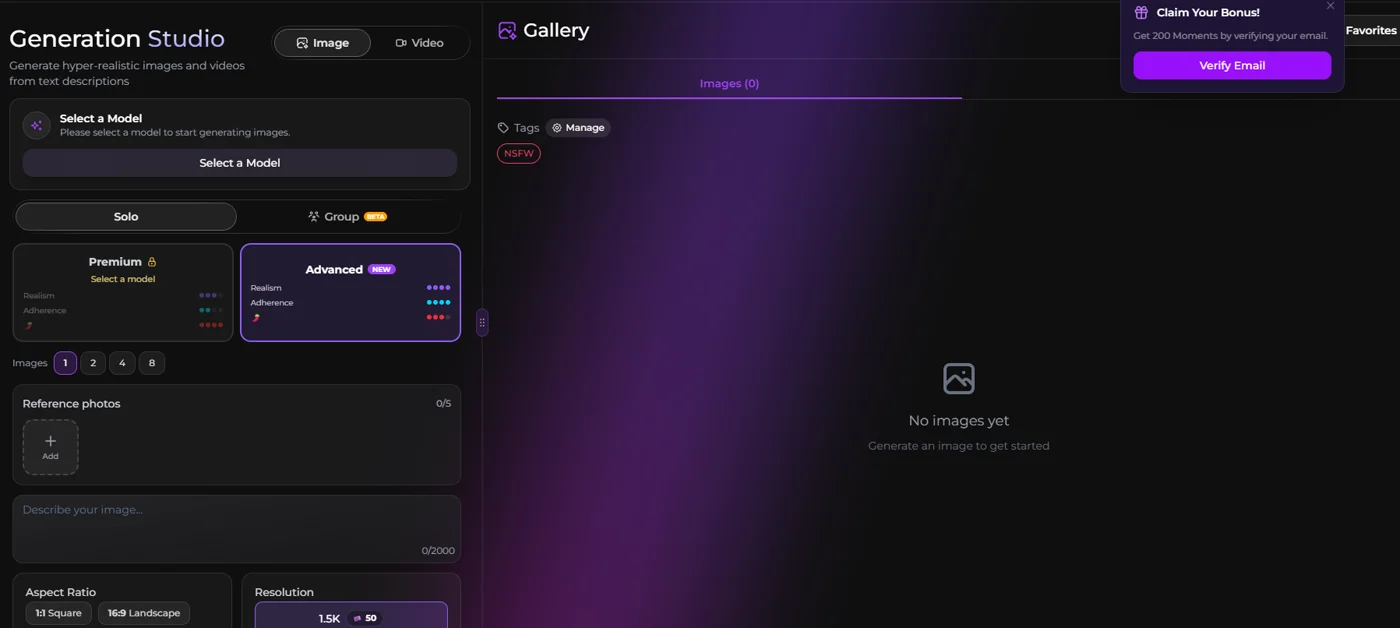
Secrets.ai's dedicated image and video dashboard, called the Generation Studio, is where the platform's picture and video generation actually happens — separate from the chat interface, built specifically around control and repeatable results. Here's what it actually offers.
Model tiers: Premium and Advanced
Want something live instead of pre-recorded? SexRoulette pairs you with a real person on cam in one tap — free, anonymous, no sign-up or history. Tap next any time.
Solo mode vs. Group mode
Most of the time you'll be generating a single companion — that's Solo mode, the default. But Secrets.ai also offers a Group mode (currently in beta) that generates multiple companions together in the same scene. This is a genuinely uncommon feature in the category; most competitor platforms only support single-character generation, full stop.
Batch size: 1, 2, 4, or 8 images per generation
Rather than forcing a single roll per prompt, the Generation Studio lets you choose how many images to generate at once — 1, 2, 4, or 8. Generating in batches of 4 or 8 is the practical move if you're testing a new prompt idea, since you can compare several interpretations of the same description side by side and pick the strongest result, instead of burning separate generation requests one at a time.
Reference photo uploads — up to 5 at once
You can upload up to five reference photos to guide a single generation. This is well above what a lot of competitor generators allow (several cap you at one reference image, if they support reference photos at all), and it's the feature most directly responsible for keeping a companion's face and body consistent across dozens of generations over time, as discussed earlier in this guide.
Prompt box: up to 2,000 characters
The text prompt field accepts up to 2,000 characters, which is enough room to actually direct a scene in detail — describe wardrobe, setting, lighting, camera angle, mood, and pose all in the same prompt rather than being forced into a vague one-liner and hoping the model guesses right.
Aspect ratio and resolution
You can choose between 1:1 Square and 16:9 Landscape aspect ratios depending on what you're generating for, and images render at 1.5K resolution.
The Video tab
Alongside Image generation, the Generation Studio has a dedicated Video tab using the same underlying workflow — model selection, Solo or Group mode, reference photo support, and a text prompt — but outputting motion rather than a static frame. Keeping video generation inside the same dashboard as photo generation, rather than as a separate standalone tool, means the settings you've already dialed in (reference photos, model tier, character context) carry over instead of forcing you to reconfigure everything from zero every time you switch from generating a photo to generating a clip.
One tap and you're on cam with someone new
SexRoulette — free, anonymous, no account needed.
Your Gallery and tagging
Every image and video you generate lands in a personal Gallery, where you can tag results for later — an "NSFW" tag is a built-in default option, useful for keeping your generations organized without manually sorting them yourself. Once you've generated more than a handful of images of a companion, a tagged, searchable gallery stops being a nice-to-have and becomes genuinely necessary — without it, finding a specific earlier generation among dozens of similar-looking results turns into a scrolling exercise. Having tagging built in from the start, rather than added as an afterthought, is a small but real quality-of-life difference from generators that just dump every result into one undifferentiated feed.
The Moments credit system
Generation and messaging on Secrets.ai both run on a credit system called Moments. New accounts get a bonus of 200 Moments just for verifying their email, which is enough to start testing image generation and chat before spending anything. We'll cover exactly how far a monthly Moments allowance stretches for generation-heavy use in the pricing section below.
If you'd rather start from a companion built entirely from scratch rather than one of the pre-made profiles, the Generation Studio pairs directly with the platform's guided character creator — our custom AI girlfriend generator walkthrough covers that 9-step process end to end, including the visual Appearance Features pickers for ethnicity, skin tone, hair, eyes, and body type.
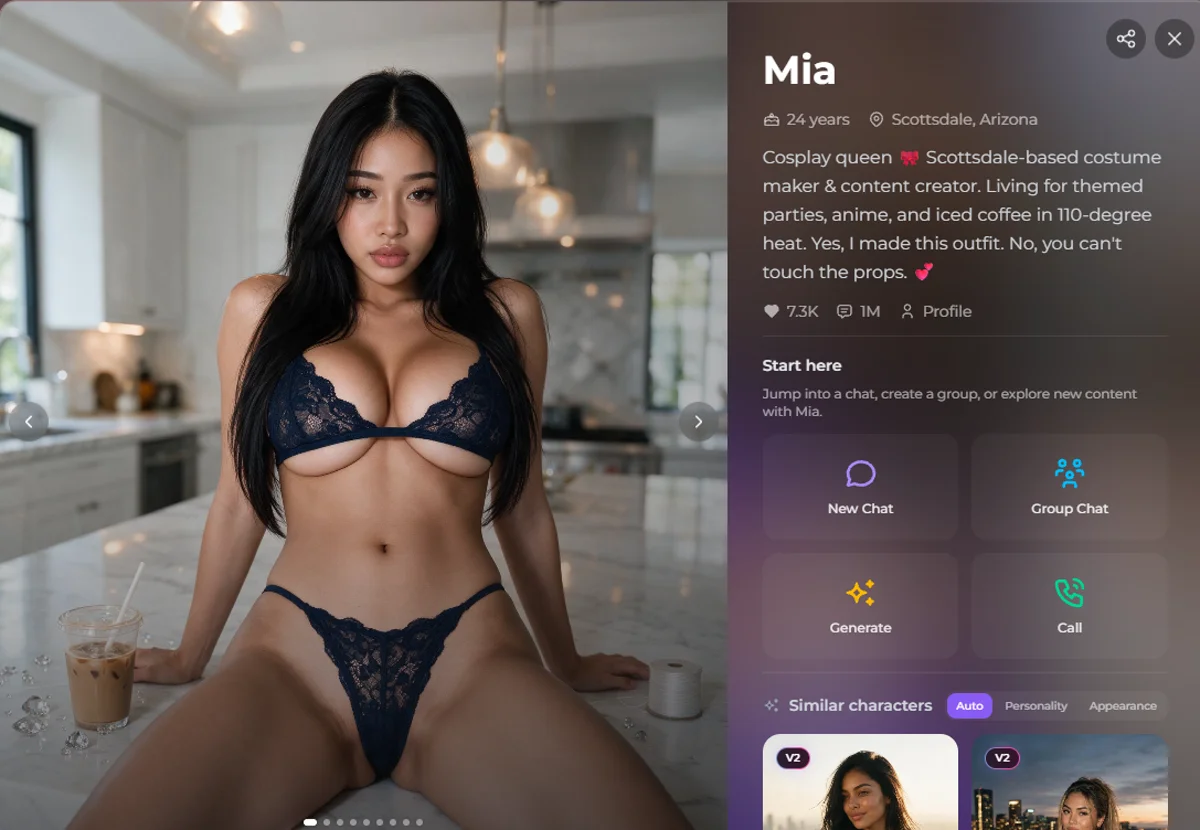
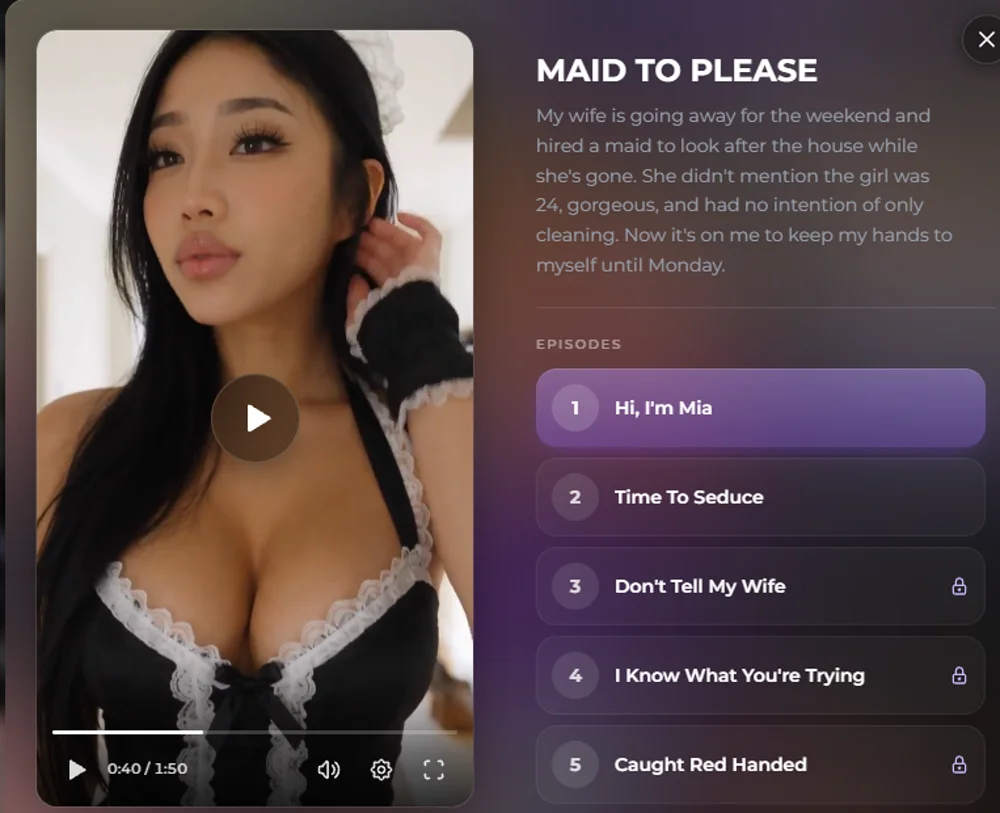
Every pre-made companion profile — like Mia, the 24-year-old from Scottsdale shown above, one of the platform's most-messaged companions with nearly a million messages sent to her — has a Generate button sitting right in the profile's action grid alongside New Chat, Group Chat, and Call. That means you don't have to leave the companion's page and hunt through a separate menu to request a new image of her specifically; generation is tied directly to the character you're already talking to, which keeps reference consistency tight because the model already has her established likeness to work from.
Secrets Shorts: the feature almost nobody else has
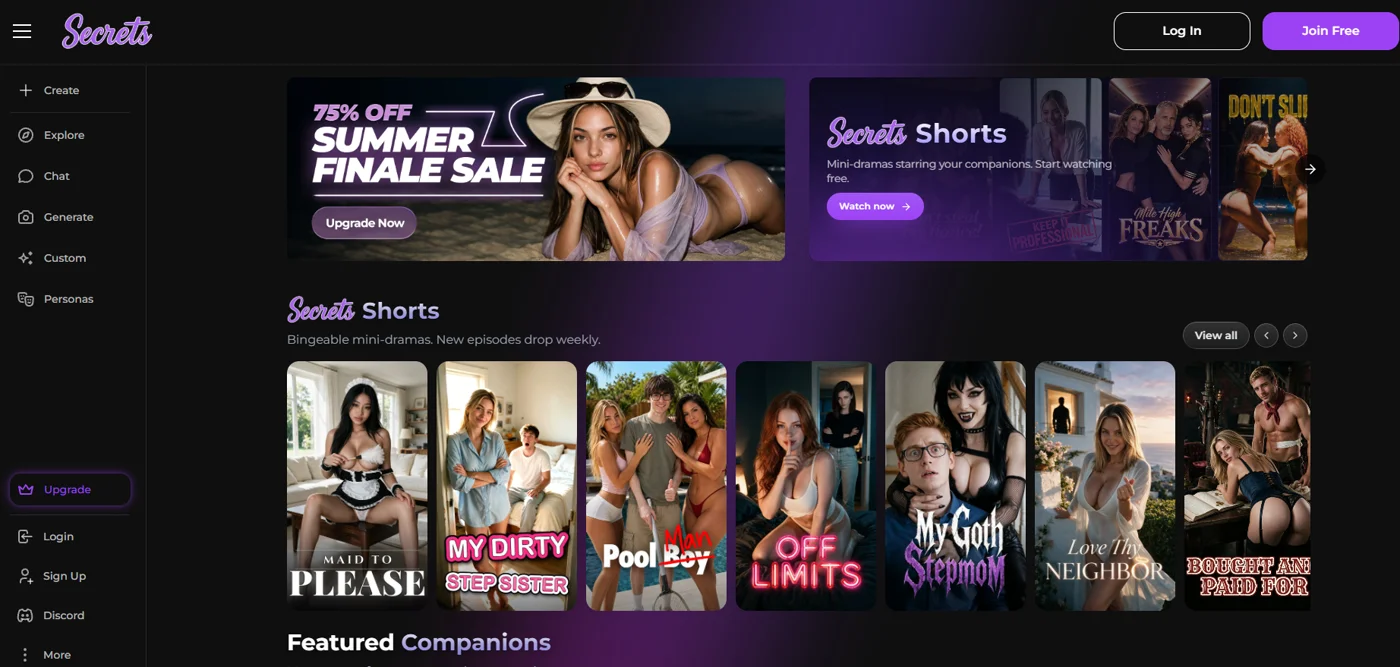
Here's the part of this guide that actually matters most if "sends pictures and videos" undersells what you're really after. Most AI girlfriend apps that support image and video generation stop at exactly that: one-off photos and short clips, generated on demand, disconnected from each other. Secrets.ai does something meaningfully different with Secrets Shorts — bingeable, scripted, episodic mini-drama video series starring the platform's AI companions, with new episodes releasing weekly.
What Secrets Shorts actually is
Think of the format less like "AI porn generator" and more like a streaming app's short-form drama category, except every character on screen is an AI companion. Each series opens with a premise — a logline, essentially, the same way a streaming show gets pitched in one sentence — and then unfolds across a run of numbered episodes.
A real example currently on the platform: "Maid to Please," premised around a hired maid who turns out to be a very different kind of distraction while the wife of the house is away. The episode run includes titles like "Hi, I'm Mia," "Time To Seduce," "Don't Tell My Wife," "I Know What You're Trying," and "Caught Red Handed" — a real story arc with rising tension and a clear narrative through-line, not a random grab-bag of disconnected clips reusing the same character.
Other series live on the platform under titles like "My Dirty Stepsister," "Pool Boy," "Off Limits," "My Goth Stepmom," "Love Thy Neighbor," and "Bought and Paid For" — a full slate of ongoing scripted premises, not a single novelty. And critically, this is described as a growing library: new episodes drop weekly, meaning it functions less like a one-time content pack and more like a show you actually follow.
Each of those titles leans into a familiar, well-worn trope — the forbidden-neighbor setup, the stepsibling storyline, the pool boy cliché — deliberately, the same way mainstream streaming and romance content leans on recognizable premises because they work. The value isn't originality for its own sake; it's that a familiar setup gives a short-form story enough shorthand to get moving fast, without needing ten minutes of setup before anything happens. For a format built around short, bingeable episodes, that's the right tradeoff.
How the unlock mechanic works
Want something live instead of pre-recorded? SexRoulette pairs you with a real person on cam in one tap — free, anonymous, no sign-up or history. Tap next any time.
Why this is a genuinely different experience than one-off generation
It's worth being explicit about why this matters rather than treating it as a nice-to-have bonus feature. A one-off generated photo or clip is, by definition, disconnected from everything else you've generated — there's no story, no continuity, no reason to come back except to generate another disconnected image. Secrets Shorts flips that. Because the episodes are scripted and sequential, watching one naturally creates the pull to watch the next — the same psychological hook that makes any episodic drama bingeable. It also means the production quality doesn't depend on your own prompt-writing skill; these are produced, structured pieces of content rather than the result of your specific text prompt on a given day.
This is, right now, one of the more distinctive things happening in the AI companion space. The overwhelming majority of competitor platforms — including well-known names like Candy AI, Replika, Nomi AI, and DreamGF — are built entirely around static photo generation and text/voice chat. Scripted episodic video content, released on a recurring weekly schedule, structured as a real story rather than isolated clips, is not something most of those platforms currently offer at all. If binge-watchable, story-driven video is specifically what you're after — as opposed to just generating individual pictures — Secrets Shorts is the reason Secrets.ai is worth prioritizing over a platform that only does static image generation.
Finding and following a series
Secrets Shorts sits in its own row on the Secrets.ai homepage, separate from the Featured Companions grid, so you don't have to dig through menus to find it — new and ongoing series are surfaced right where you land after logging in. Once you open a series, the player shows the episode synopsis alongside a numbered list of every episode in that story, with locked and unlocked entries clearly marked, so you always know exactly where you are in the story and how much more of it exists to unlock. That structure — a visible episode list with a synopsis, rather than a single undifferentiated video feed — is what makes the "following a show" comparison accurate rather than just a marketing description.
Why weekly releases change the relationship to the content
A platform that ships all its video content in one static batch invites you to consume it once and move on. A platform that adds new episodes on a recurring weekly schedule gives you a reason to come back on a rhythm, the same mechanic that's kept people checking in on weekly-release streaming shows for years. For an AI companion platform specifically, that also means the relationship with a given companion character can keep developing over time through her Shorts storylines, rather than being frozen at whatever her profile said the day you signed up. It's a meaningfully different pacing than a chat-only companion, where "progress" is really just accumulated conversation history rather than an actual unfolding plot.
Get Matched With Someone Live Right Now
SexRoulette is free and anonymous — no sign-up, no history. Tap next any time.
Start Now →Comparing the tiers of AI girlfriend apps
Not every AI companion platform is trying to do the same thing, and it's genuinely useful to think of the category in tiers rather than as one flat market. Here's how that breaks down, positioned generically so you can evaluate any platform you're considering against it — not just Secrets.ai.
| Tier | What you get | Typical limitations | Where Secrets.ai sits |
|---|---|---|---|
| Text-only companions | Conversation, personality, memory of past chats | No visuals at all beyond a static profile picture | Not applicable — Secrets.ai always includes generation |
| Photo generation only | On-demand generated images of your companion | Often weak consistency, low resolution, single-image generation only, no video | Exceeded — Secrets.ai includes this plus batch generation up to 8 images, reference photos, and video |
| Photo + basic video | Generated images plus short animated clips | "Video" is frequently just a stills-with-motion-filter effect, not true new footage; no ongoing story structure | Included, via the Generation Studio's Video tab |
| Photo + video + episodic series | Everything above, plus scripted, multi-episode story-driven video content released on a recurring schedule | Rare — most competitors don't offer this tier at all | This is where Secrets.ai stands out, via Secrets Shorts |
A few things worth noting about how to actually use a table like this when you're evaluating a platform yourself, rather than taking any single app's marketing claims at face value. First, ask what tier a platform is actually claiming to be in, then verify it — a landing page that says "video" prominently but only demonstrates animated stills in its own sample gallery is quietly telling you it belongs in the second tier, not the third, regardless of the word choice. Second, treat "episodic" claims skeptically until you see an actual numbered episode list with a synopsis and locked/unlocked structure, the way Secrets Shorts presents it — a handful of loosely related clips grouped under a shared title isn't the same thing as a structured story. Third, remember that tiers aren't just about ambition; they typically also track directly with subscription price, so a platform sitting in the top tier is usually going to cost more than a photo-only generator, and that's a reasonable tradeoff to expect rather than a red flag.
If you want the fuller side-by-side across specific competitor platforms rather than generic tiers, our AI girlfriend apps comparison guide and best AI girlfriend apps ranking go deeper on that. For a broader look specifically at static AI image generation tools outside the companion-app category, see our AI porn generators guide; if anime or hentai-style output is more your interest than photorealism, our AI hentai generator guide covers that adjacent space. And if generated imagery specifically in VR-compatible formats is what you're after, our AI/VR porn guide covers that more specialized corner of the category.
Practical tips for getting good generated images and video
Understanding the technology is one thing — actually getting consistently good results out of it is another. Here's what tends to separate a frustrating generation session from a genuinely satisfying one.
Write layered prompts, not one-liners
A prompt like "sexy photo" gives the model almost nothing to work with, so it fills in the gaps with generic defaults. A prompt that specifies setting, wardrobe, lighting, camera angle, and mood in the same request gives the model actual direction. With up to 2,000 characters available in the Generation Studio's prompt box, there's no real reason to under-describe what you want — use the space.
Upload multiple reference photos when consistency matters
If you're building toward a specific look you want to see repeated across many generations, don't rely on a single reference image. Uploading several — different angles, different lighting — gives the model more to anchor to, which is the single biggest lever you have over face and body consistency across a series of images.
Generate in batches and pick, don't settle for the first result
Since the Generation Studio supports batches of 2, 4, or 8 images per prompt, use that instead of generating one image, disliking it, and re-rolling from scratch repeatedly. A batch of 4 or 8 from the same prompt gives you real options to compare, and it's a more efficient use of your Moments than a string of single, separate generations.
Match aspect ratio to intended use
Square (1:1) generations tend to work better for portrait-style, close-up shots, while landscape (16:9) suits full-scene or full-body compositions. Picking the aspect ratio that actually fits the shot you're imagining, rather than defaulting to whichever one is selected, noticeably improves how "intentional" the final image looks.
Use the companion profile's Generate button for in-character consistency
Generating directly from a specific companion's profile page (rather than starting a generation from scratch) keeps the model anchored to that character's established likeness, since her existing photos and profile data are already available as context. This is the more reliable path if the goal is more images of a companion you already like, rather than experimenting with a new look entirely.
Try Solo mode before Group mode
Group mode is still in beta, which generally means less predictable results than the more mature Solo generation pipeline. If consistency is your top priority, lean on Solo mode for your core generations and treat Group mode as an experimental extra rather than your primary workflow.
Iterate within the same session instead of starting over
If a generation is close but not quite right, small, targeted changes to the same prompt tend to outperform writing an entirely new prompt from scratch. Adjust one variable at a time — lighting, then pose, then setting — rather than rewriting the whole description, so you can actually tell which change moved the result in the direction you wanted. This also tends to be more efficient with your Moments balance than repeatedly starting from a blank prompt and hoping for a better random result.
Reach for the Advanced model when detail is the priority
Since the Generation Studio offers a choice between the Premium and the newer Advanced model, it's worth deliberately picking the higher tier for generations where fine detail actually matters — texture, lighting nuance, background complexity — and reserving the faster option for quick, lower-stakes experiments where you're mostly testing an idea rather than producing a keeper.
If you want a full step-by-step on building a companion from the ground up — choosing ethnicity, skin tone, hair, eyes, and body type through the visual picker grid rather than starting from a pre-made profile — our dedicated custom AI girlfriend generator walkthrough covers the entire 9-step wizard.
Pricing, specifically for image and video generation
Messaging is unlimited on both of Secrets.ai's paid tiers, so the number that actually matters for this guide's topic is your monthly Moments allowance — since every image and video generation draws from that same pool.
| Plan | Price | Moments per month | What's included |
|---|---|---|---|
| Premium | $2.12/week billed yearly ($109.99/year total), or $4.61/week billed monthly | 8,000 Moments/month | Unlimited messaging, image & video generation, premium AI models |
| Ultimate | $6.15/week billed yearly ($319.99/year total), or $9.23/week billed monthly | 15,000 Moments/month | Everything in Premium, plus group chats, Personas & advanced customization |
The practical read: if generation is your main use case — you're planning to lean on the Generation Studio regularly, batch-generate images, and work through Secrets Shorts episodes — the Ultimate tier's near-double Moments allowance (15,000 vs. 8,000) gives you meaningfully more headroom before you're watching your balance during every session. If you're a lighter user who mostly chats and generates occasionally, Premium's 8,000 Moments per month is a reasonable starting point, especially while the site-wide 75% off Summer Finale Sale is active.
It helps to actually think through your own usage pattern before picking a tier, rather than defaulting to whichever plan is cheaper. Someone who mostly wants unlimited conversation with the occasional generated photo as a bonus is a very different user than someone planning to batch-generate 8 images per session multiple times a week, work through custom-generator builds, and binge Secrets Shorts episodes on top of it all. The first profile fits comfortably inside Premium's allowance; the second is exactly who Ultimate's larger Moments pool and Personas access were built for. If you're not sure which camp you're in yet, that's precisely what the 200-Moment signup bonus is for — spend it deliberately across a few chat sessions and a couple of batch generations, watch how quickly the balance actually moves, and let that real usage data decide the tier for you instead of guessing upfront.
It's also worth remembering that messaging itself is unlimited on both tiers — Moments are specifically the currency for image and video generation, not a general usage meter for the whole platform. That means a heavy texter who rarely generates images can comfortably stay on Premium indefinitely and barely dent a monthly Moments balance, while someone generating images and video constantly is the profile who'll actually feel the difference between 8,000 and 15,000 Moments a month. In other words, your actual mix of activities — not just how much you're paying — is what determines how far a given month's allowance stretches.
Both tiers bill discreetly — charges appear on your card or bank statement as "S LABS INC.," not "Secrets.ai" — and both are cancel-anytime with no cancellation questions asked. New accounts also get a 200 Moments bonus just for verifying their email, which is enough to test both chat and generation before you decide which tier fits your actual usage.
For the complete breakdown of both tiers, billing cycles, and how Secrets.ai's pricing stacks up against what competitor apps charge for comparable features, see our full Secrets.ai pricing guide. And if talking, not just texting, is part of what you're after alongside the visuals, see the current pricing on Secrets.ai and pair it with our breakdown of the AI voice call feature to understand exactly what's included at each tier.
Free Sex Video Chat — One Tap to Someone Live
SexRoulette is free and anonymous — no sign-up, no history. Tap next any time.
Start Now →Where this leaves you
If what you actually want is a companion that can send you a genuinely new, recognizably-her photo on request — not a stock image, not a face that shifts every time — the technology to do that well exists now, but it's not evenly distributed across the category. Reference-photo conditioning, batch generation, a real resolution figure instead of a vague quality claim, and a credit system that doesn't quietly starve you after a handful of generations are the specific things worth checking before you subscribe anywhere.
And if what you're really after goes beyond individual pictures into something closer to an actual story — characters, plot, episodes you look forward to the way you'd look forward to a new episode of a show — that's a meaningfully rarer feature, and right now Secrets Shorts is one of the clearest examples of a platform building toward that rather than stopping at one-off image generation. Between the Generation Studio's depth (up to 8 images per batch, 5 reference photos, a 2,000-character prompt box, model choice between Premium and Advanced) and Secrets Shorts' weekly episodic drops, it's a meaningfully deeper implementation than "generate a picture, hope it looks like her."
Want something live instead of pre-recorded? SexRoulette pairs you with a real person on cam in one tap — free, anonymous, no sign-up or history. Tap next any time.
Frequently Asked Questions
Does Secrets.ai actually generate real photos, or does it use stock images?
Secrets.ai generates real, original images on request through its Generation Studio, using a diffusion-based AI model rather than pulling from a library of stock or pre-shot photos. You choose a model tier (Premium or Advanced), write a prompt of up to 2,000 characters, and can upload up to 5 reference photos to guide how the result looks — the output is unique to your specific prompt each time, not a repeated stock asset.
Is the "video" feature real video, or just an animated photo?
It depends what you're asking about. The Generation Studio's Video tab produces generated video content distinct from the animated-still-with-a-zoom-effect trick some cheaper platforms use. Separately, Secrets Shorts is a different and more distinctive format entirely — pre-produced, scripted episodic mini-drama series with real story continuity across episodes, which is not something most competitor AI companion apps currently offer at all.
Can Secrets.ai do a real live video call with my AI girlfriend?
No, and it's worth being direct about this: as of 2026, no mainstream AI companion platform, including Secrets.ai, offers genuine real-time, two-way live video calling. What Secrets.ai does offer is an AI voice call feature, available from a companion's profile page alongside New Chat, Group Chat, and Generate. If voice interaction specifically is what you're after, our voice call apps guide covers how that feature actually works.
How many images can I generate with the Premium plan?
Premium includes 8,000 Moments per month, which covers unlimited messaging plus image and video generation using the platform's premium AI models. Exactly how many images that translates to depends on batch size and generation settings, but it's enough for regular generation use without constantly monitoring your balance. If you're a heavy generation user, the Ultimate tier's 15,000 Moments per month gives you closer to double the headroom.
What's the difference between Solo and Group generation mode?
Solo mode generates a single companion per image or video, and it's the platform's default, more mature generation pipeline. Group mode, currently in beta, generates multiple companions together in the same scene — a genuinely uncommon capability in the AI companion category, though as a beta feature it's reasonable to expect it to be less predictable than Solo generation for now.
Do I need to upload my own photos to use the generator?
No — reference photo uploads (up to 5 per generation) are optional and mainly useful for steering consistency toward a specific look you already have in mind, whether that's matching a particular companion's established appearance more tightly or guiding a new custom companion's features. You can generate perfectly well using only a text prompt if you'd rather not upload anything.
Is Secrets Shorts included in my subscription, or is it a separate purchase?
The first episode of any Secrets Shorts series is free to watch with no subscription required at all, so you can sample the format before committing to anything. Later episodes within the same story then unlock with a paid subscription, the same general mechanic most streaming platforms use for premium content — it isn't billed as a separate, standalone purchase on top of your plan.
How discreet is billing if I generate images or watch Secrets Shorts regularly?
Billing is discreet regardless of how you use the platform — messaging, image generation, or Secrets Shorts. Charges appear on your card or bank statement under "S LABS INC.," with no reference to Secrets.ai anywhere in the transaction description, and both plans are cancel-anytime with no cancellation questions asked.
SexRoulette
Skip the tube. Talk to a real person on cam, free
Anonymous 1-on-1 video chat. Tap next any time.
Start Chatting→No sign-up. No history. Tap next anytime.